Knowledge Bases for Amazon Bedrock 으로 맞춤형 응답 제공하기
-
아래의 지식 기반 데이터를 복사하여
abcd_company_kb.txt로 저장합니다.ABCD Company Information: ABCD Company is an online retailer specializing in consumer electronics and gadgets. Founded in 2010, we offer a wide range of products including smartphones, laptops, smart home devices, and wearables. Return Policy: - Items can be returned within 30 days of purchase for a full refund. - Products must be in original condition with all accessories and packaging. - Customers are responsible for return shipping costs unless the item is defective. - Refunds are processed within 5-7 business days after receiving the returned item. Shipping Information: - Free standard shipping on orders over $50. - Standard shipping (5-7 business days): $5.99 - Express shipping (2-3 business days): $12.99 - Overnight shipping (1 business day): $24.99 - International shipping available to select countries. Popular Products: 1. ABCD Smartphone X1 - 6.5" OLED display, 5G capable, 128GB storage - Price: $799.99 2. ABCD Laptop 15 - 15" 4K display, Intel i7 processor, 16GB RAM, 512GB SSD - Price: $1,299.99 3. ABCD SmartHome Hub 2000 - Compatible with Alexa and Google Assistant - Price: $129.99 Customer Support: - Email: support@abcdcompany.com - Phone: 1-800-ABCD-HELP (1-800-222-3435) - Live chat available on our website from 9 AM to 9 PM EST Warranty Information: - All products come with a standard 1-year limited warranty. - Extended warranty options available for purchase. - Warranty covers manufacturing defects and hardware failures. Frequently Asked Questions: Q: How do I track my order? A: You can track your order by logging into your account on our website or using the tracking number provided in your shipping confirmation email. Q: Do you offer price matching? A: Yes, we offer price matching for identical products from authorized retailers within 14 days of purchase. Q: Can I cancel my order? A: Orders can be cancelled within 1 hour of placement. After that, please contact our customer support team for assistance. Q: Do you have physical store locations? A: ABCD Company is an online-only retailer. We do not have physical store locations at this time.- 해당 문서는 고객이나 직원들이 ABCD Company의 주요 정책과 제품에 대해 빠르게 참조할 수 있도록 구성되어 있습니다.
-
지식 기반 데이터 저장을 위해 S3 콘솔에서 버킷 만들기 로 이동합니다.
-
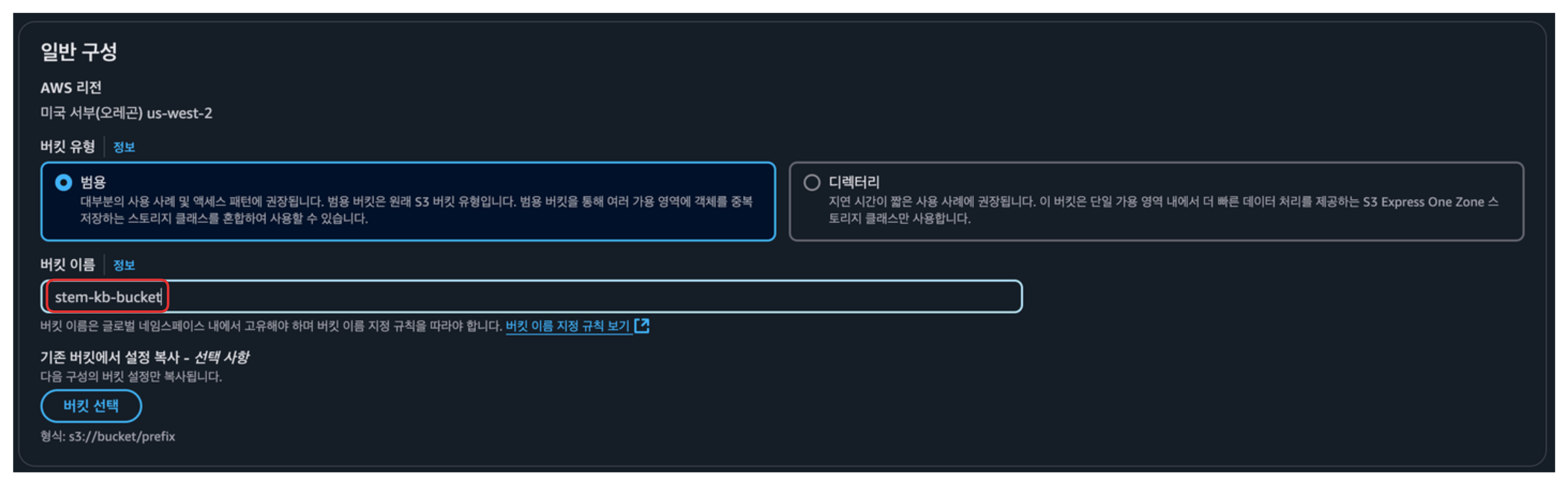
원하는 버킷 이름을 설정한 후, 버킷 만들기를 통해 버킷을 생성합니다.
-
생성된 버킷을 클릭한 후
업로드>파일 추가를 클릭하여abcd_company_kb.txt파일을 업드합니다 .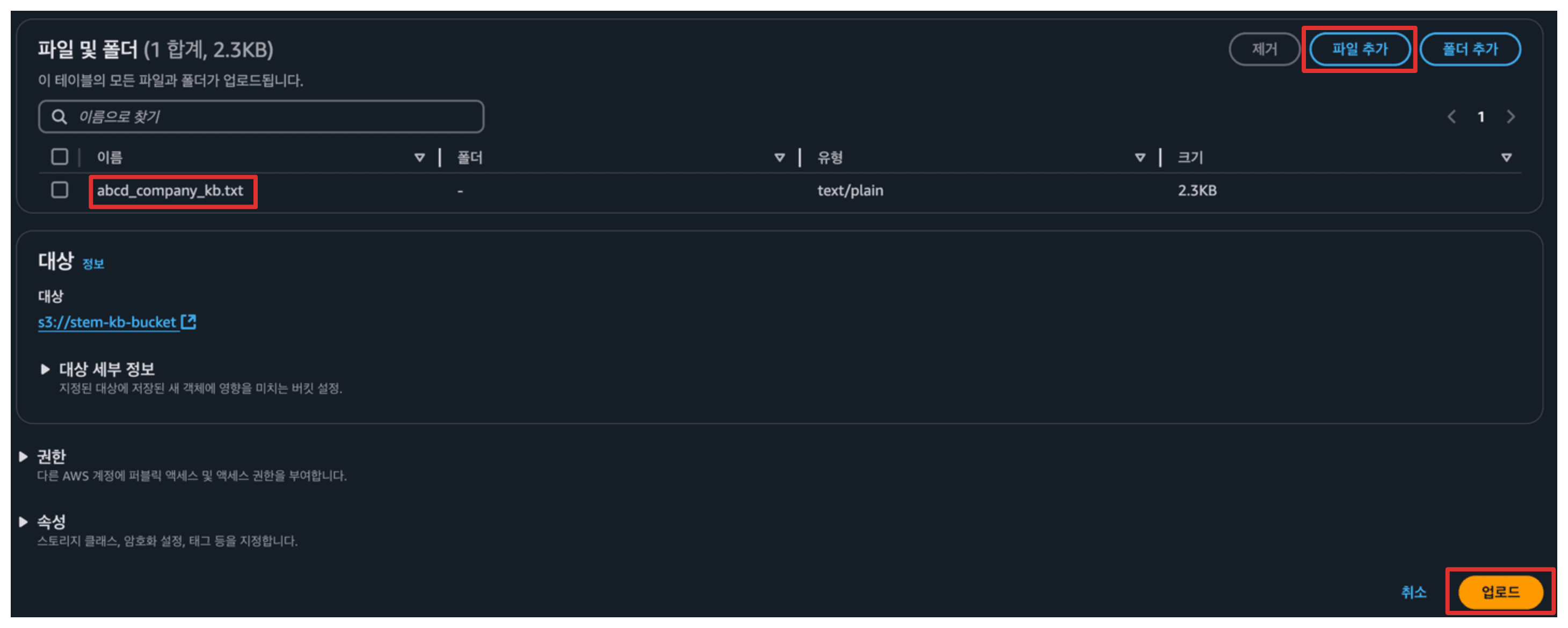
-
Bedrock 콘솔에서 지식 기반 탭으로 이동합니다
-
지식 기반 생성>Knowledge Base with vector store를 선택해 새로운 지식 기반을 생성합니다.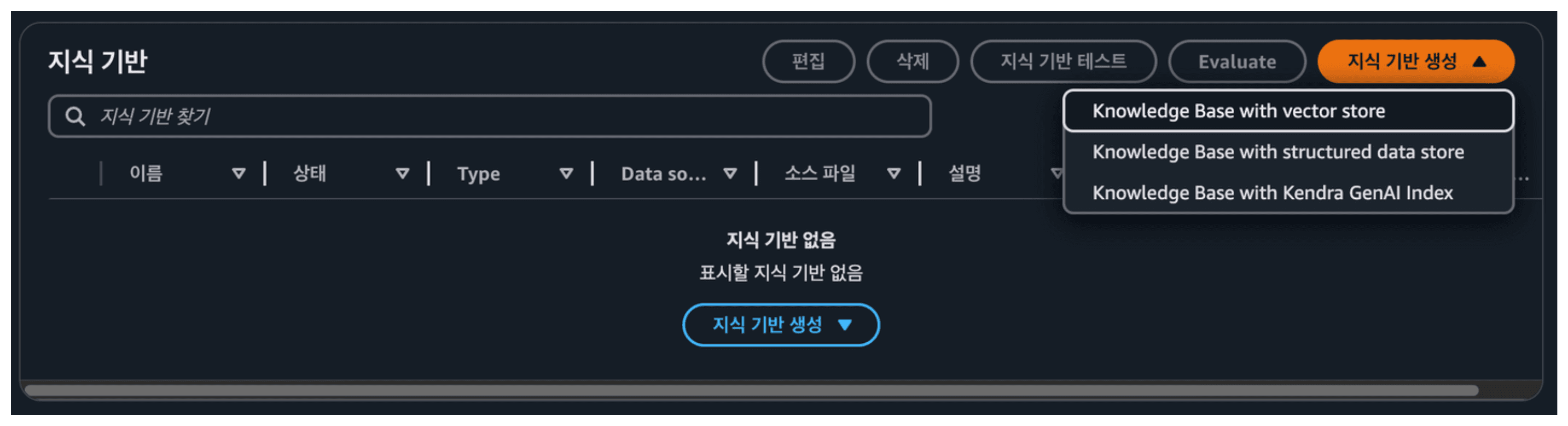
-
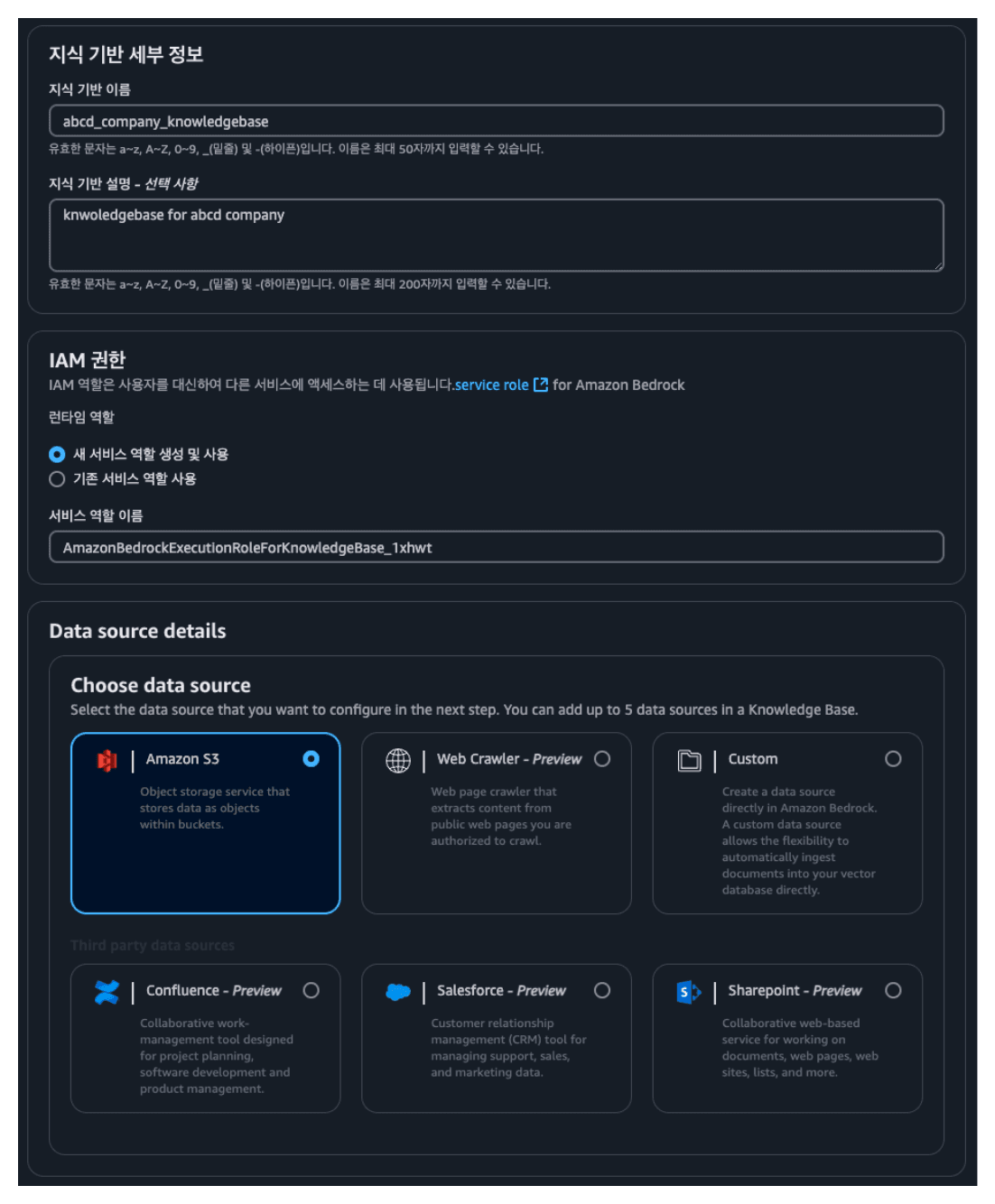
지식 기반 세부 정보 제공 페이지에서 다음과 같이 설정한 후 다음을 클릭합니다.
- 지식 기반 이름:
abcd_company_knwoldegebase - 지식 기반 설명:
Knowledge base for abcd company
- 지식 기반 이름:
-
이전에 생성한 S3 버킷을 S3 URI 필드에서 선택하고 다음을 클릭합니다.
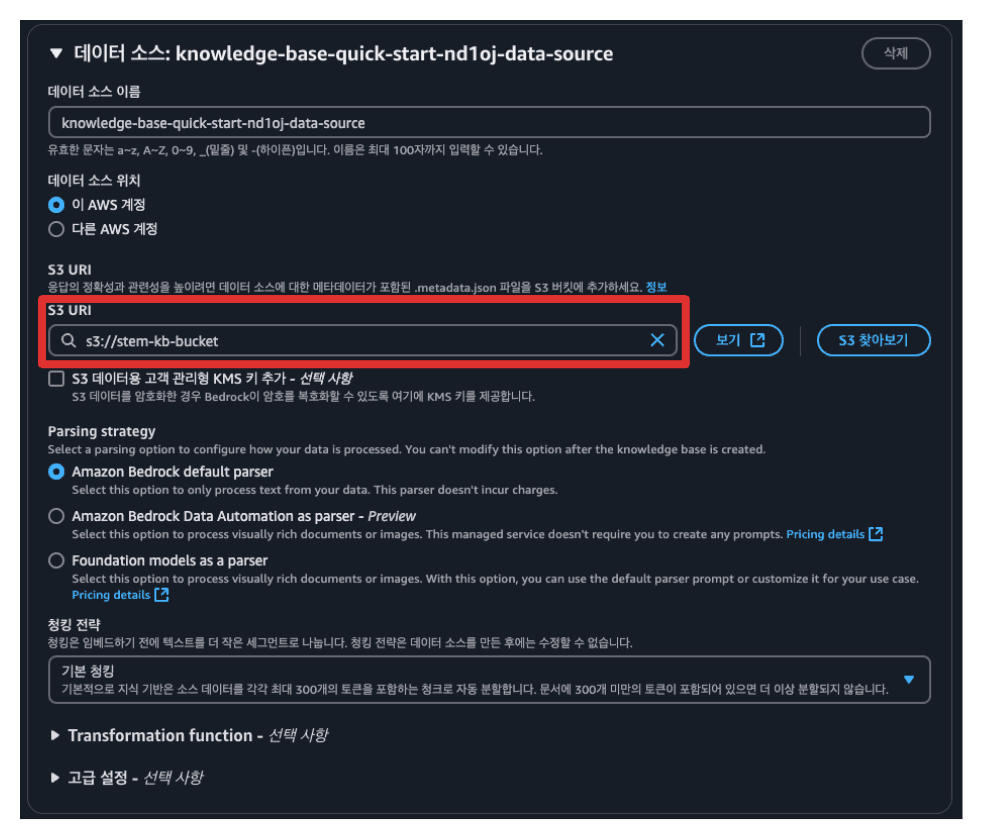
-
임베딩 모델로는
Titan Text Embeddings V2를 선택하고 다음을 클릭합니다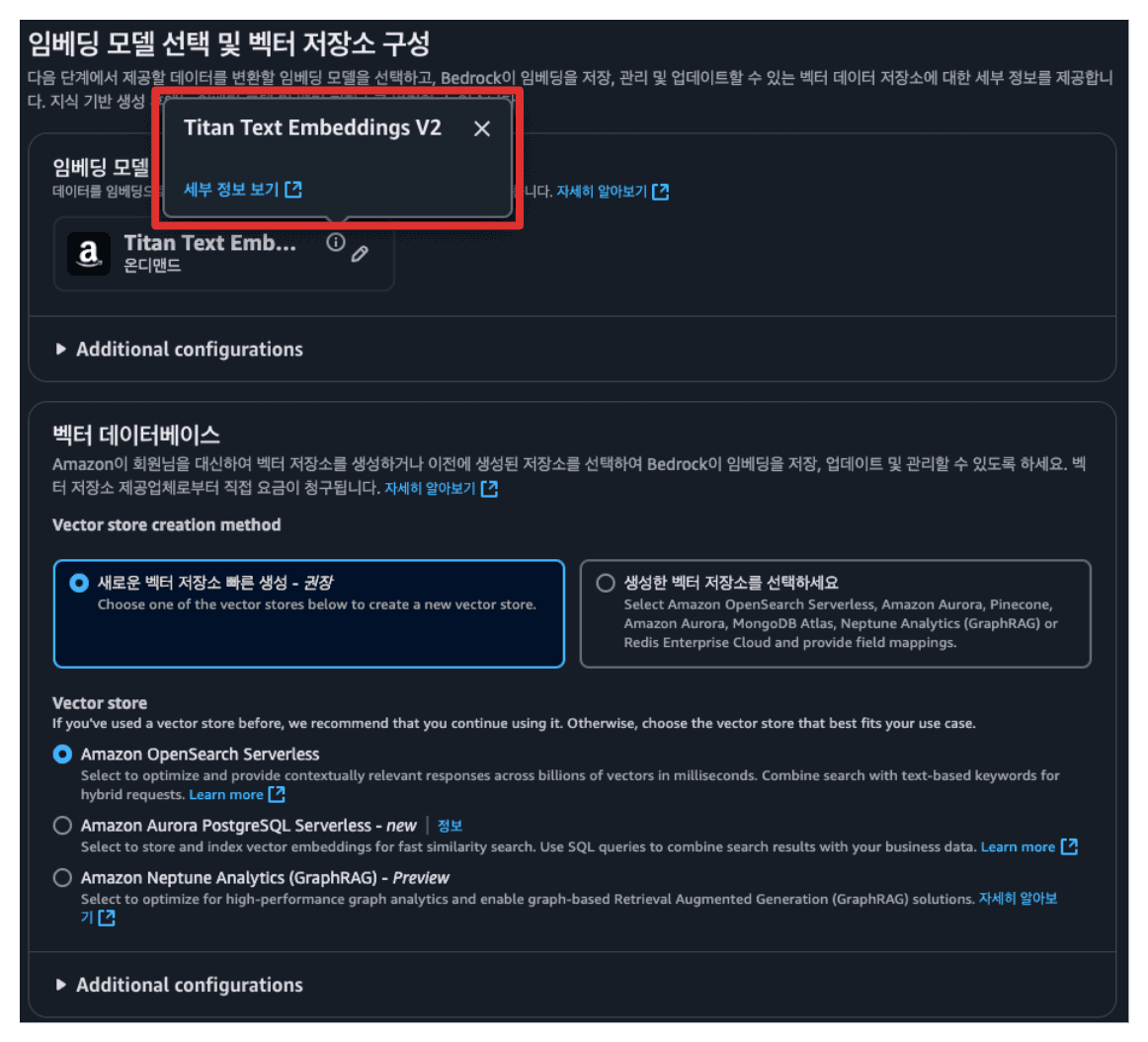
-
이후
지식 기반 생성버튼을 눌러 지식 기반을 생성합니다. -
아래와 같이
demo2.py파일을 입력합니다.vi demo2.py# demo2.py from langchain_core.prompts import ChatPromptTemplate from langchain_core.runnables import RunnablePassthrough, RunnableParallel from langchain_core.output_parsers import StrOutputParser from langchain_aws import ChatBedrock, AmazonKnowledgeBasesRetriever import boto3 import streamlit as st # config.py에서 필요한 설정값들을 가져옴 from config import (REGION, MODEL_ID, KB_ID, MAX_TOKENS, TEMPERATURE, TOP_K, TOP_P) # 스트림릿 웹 페이지 설정 st.set_page_config(page_title='Amazon Bedrock 기반 고객상담 챗봇') # 첫 실행시 채팅 이력을 초기화하고 환영 메시지 설정 if "messages" not in st.session_state.keys(): st.session_state.messages = [{"role": "assistant", "content": "How may I assist you today?"}] def setup_langchain(): """LangChain 구성요소들을 초기화하고 체인을 구성""" # Bedrock 서비스 클라이언트 생성 bedrock_runtime = boto3.client( service_name="bedrock-runtime", region_name=REGION ) # LLM 모델의 추론 설정 model_kwargs = { "temperature": TEMPERATURE, # 응답의 다양성 조절 (0-1) "max_tokens": MAX_TOKENS, # 생성할 최대 토큰 수 "top_k": TOP_K, # 다음 토큰 선택시 고려할 상위 토큰 수 "top_p": TOP_P, # 누적 확률 기준 토큰 필터링 "stop_sequences": ["\n\nHuman"] # 응답 생성 중단 조건 } # LLM에 전달할 프롬프트 템플릿 정의 template = ''' Answer the question based on the context below. If the question cannot be answered using the information provided answer with "I don't know". Context: {context} Question: {question} ''' prompt = ChatPromptTemplate.from_template(template) # Knowledge Base 검색기 설정 retriever = AmazonKnowledgeBasesRetriever( knowledge_base_id=KB_ID, retrieval_config={"vectorSearchConfiguration": {"numberOfResults": 4}}, region_name=REGION, credentials_profile_name=None ) # Bedrock 모델 초기화 model = ChatBedrock( client=bedrock_runtime, model_id=MODEL_ID, model_kwargs=model_kwargs ) # LangChain 실행 체인 구성 return ( RunnableParallel({"context": retriever, "question": RunnablePassthrough()}) .assign(response = prompt | model | StrOutputParser()) .pick(["response", "context"]) ) def process_chat(chain, user_prompt, streaming: bool = False): """채팅 요청을 처리하고 응답을 생성""" if streaming: return chain.stream(user_prompt) else: return chain.invoke(user_prompt) # 사이드바 구성 with st.sidebar: st.title('Amazon Bedrock 기반 고객상담 챗봇') streaming_enabled = st.toggle('Enable Streaming', False) # LangChain 초기화 chain = setup_langchain() # 이전 대화 내용을 화면에 표시 for message in st.session_state.messages: with st.chat_message(message["role"]): st.write(message["content"]) # 사용자 입력 처리 if prompt := st.chat_input(): # 사용자 메시지 저장 및 표시 st.session_state.messages.append({"role": "user", "content": prompt}) with st.chat_message("user"): st.write(prompt) # AI 응답 생성 및 표시 with st.chat_message("assistant"): response_placeholder = st.empty() full_response = "" context = None if streaming_enabled: # 스트리밍 모드로 응답 생성 for chunk in process_chat(chain, prompt, streaming=True): if 'context' in chunk: context = chunk['context'] if 'response' in chunk: full_response += chunk['response'] response_placeholder.write(full_response) else: # 일반 모드로 응답 생성 response = process_chat(chain, prompt) full_response = response['response'] context = response['context'] response_placeholder.write(full_response) # 참조 문서 정보 표시 with st.expander("참조한 문서 정보 >"): if context: st.write(context) else: st.write('참조한 문서가 없습니다.') # 응답 저장 st.session_state.messages.append({"role": "assistant", "content": full_response})esc+:wq+enter를 입력해 저장합니다.
-
지식 기반에서 방금 생성된 지식 기반을 클릭한 후 데이터 소스를 선택,동기화를 클릭해 Knowledge Base를 위해 S3에 넣어두었던 데이터를 동기화합니다.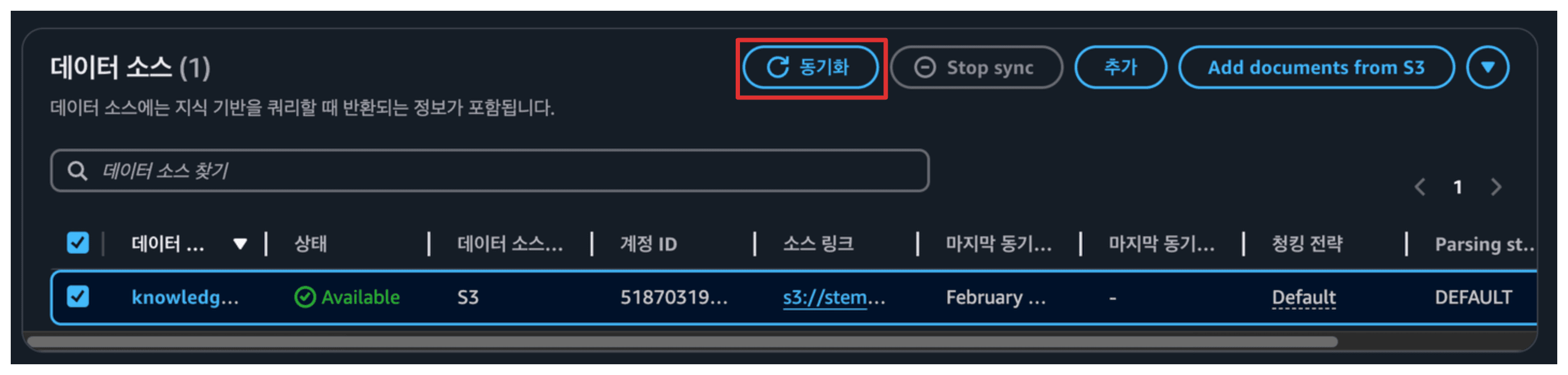
-
EC2 인스턴스로 돌아가 아래 명령어를 실행하여 사용할
지식 기반아이디를config.py에 입력합니다.vi config.pyi를 눌러 수정 모드로 들어갑니다.
# config.py ... # 이전 설정들 KB_ID = "<지식 기반 아이디>"esc+:wq+enter를 입력해 저장합니다.
-
아래 명령어를 통해 서버를 재시작합니다.
streamlit run demo2.py --server.port 80 --server.address 0.0.0.0 -
다음과 같은 질문을 이용해 Knowledge Base가 추가된 모델을 테스트해 봅시다.
- “ABCD Company는 어떤 회사인가요?”
- “ABCD Company는 어떤 물건을 판매하나요?”
- “ABCD Smartphone X1의 가격과 주요 스펙은 무엇인가요?”
- “고객 지원 센터 운영 시간은 어떻게 되나요?”
Last updated on